







Keep your calendars in sync
Create a sync between two calendars with our award-winning service. 2-minute setup, safe and secure, and it protects your privacy.


Trusted by professionals around the world








How calendar sync works
Enjoy our set-and-forget approach — we keep your Google, Outlook and iCloud calendars in sync, automatically.
2-minute setup
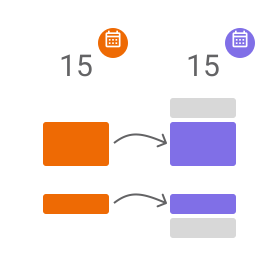
Copy your free/busy times across your calendars in real time
Connect your Google, Outlook or iCloud calendars, choose a source and a target, and you're all set — we handle copying every upcoming event for you.
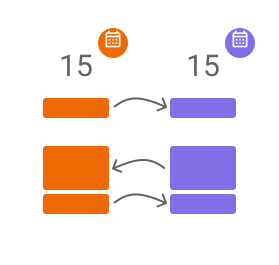
One-way or two-way syncs
Multi-way calendar sync direction
Choose whether your calendars mirror events both ways, or only copy from one to another. It's entirely up to you.
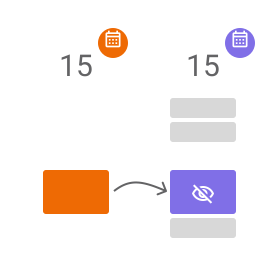
Privacy focused
Keep control of your event details
Hide the details of any field in the copied event — title, description, location and more — behind a simple 'Busy' block.
Why SyncThemCalendars
Unlimited, effortless, private
2-minute setup
No installs, no IT project. Connect, create a sync, and you're done.
Unlimited events
Every plan syncs an unlimited number of events across an unlimited number of calendars.
Your data stays yours
We only use your data to copy events between your calendars. Nothing else, ever.
What they say about us
Loved by our users since 2019
Rated by real users on


I absolutely love being able to sink my calendars so that I am not overbooking myself, as a stay at home mom, active member of my church and running two small businesses it sometimes gets very hectic keeping up with my own schedule and switching between calendars can be overwhelming this is a game changer!
 Neicee Sweet Google Workspace Marketplace
 It actually works. I needed to sync my outlook calendar to my google calendar. I tried a free way to do it, but it wouldnt show up on my phone calendar so that was a waste. This was super simple and it did sync seemlessly with both deskptop and phone google calendar.
 Isra Hashmi Google Workspace Marketplace
 I searched all day for a way to sync a shared webcal and my personal ical but had no luck, until i found this! It works great!
 Dustin McCloud Google Workspace Marketplace
 The Sync Them Calendar app is a must-have for anyone managing multiple schedules across personal, work, and shared calendars. Built for ease of use and efficiency, it provides a smooth and intuitive way to stay organized and keep track of important commitments.
 Robert Nguyen Google Workspace Marketplace
 Fantastic when juggling multiple calendars for multiple jobs or organizations!
 Jamie Daniels Google Workspace Marketplace
 Use it to copy Outlook events over to my Google Calendar. Easier to implement and more reliable than Zapier.
 Eric Jackson Google Workspace Marketplace
 Simple easy and efficient. Easy streamline process and compatibility with Windows and Google. Allows me to merge both worlds in maximum scheduling efficiency c
 Sterling Spires Google Workspace Marketplace
 The setup is as simple as they say it is! I love having all of my calendars in one place!
 Sherri Goodall Google Workspace Marketplace
 The only calendar app that actually worked to sync my icloud and google accounts so can have my calendars on both my phone and laptop. Amazing App!!!
 Brandy Glass Google Workspace Marketplace
 Easy to setup, does exactly what it says it does. Love not having two calendars to track!
 Jeff Leyser Google Workspace Marketplace
 Seemless process; worked right out of the box with a few clicks and finally got this pesky Outlook - Gmail problem solved.
 Adrian Pryce Google Workspace Marketplace
 Amazing tool! Finally found the solution I needed.
 Nick Hatton Google Workspace Marketplace
 Finally I could load my outlook events into my gmail calendar.
 Marcela Calderón Google Workspace Marketplace
 Helped me keep all of my appointments in sync. It was very easy to install and worked great! I definitely recommend this app for anyone who has multiple calendars to shuffle.
 Kelly Maxson Google Workspace Marketplace
 The only way to sync my Microsoft/ Outlook account to my Google account
 Paul Coombes Google Workspace Marketplace
 Pricing
Simple pricing that scales with you
Start with a 14-day free trial. No credit card required.
Basic
$47.88 billed yearly
Start for free- 5 calendar syncs
- Unlimited events
- Unlimited calendars (all types)
- Google, Outlook & Apple iCloud
- 1 user
Premium
$95.88 billed yearly
Start for free- 16 calendar syncs
- Unlimited events
- Unlimited calendars (all types)
- Google, Outlook & Apple iCloud
- 1 user
Professional
$215.88 billed yearly
Start for free- 36 calendar syncs
- Unlimited events
- Unlimited calendars (all types)
- Google, Outlook & Apple iCloud
- 1 user
All plans include a 14-day free trial.
FAQ
Frequently asked questions
What does SyncThemCalendars exactly do?
It keeps two or more of your calendars in sync by automatically copying events between them — filling a gap that leading services like Google Calendar leave open.
Why do I need calendar sync?
Common cases: managing multiple client calendars, running several businesses, or blocking your personal time on a work calendar so colleagues can't book over it — without revealing what it is.
Is it free?
You get a 14-day free trial with no credit card required. After that, a paid subscription keeps your syncs running.
What calendar providers are supported?
Google Calendar, Microsoft Outlook / Office 365, and Apple Calendar (iCloud). You can sync across any combination of them.
Will you use my data?
Your data is only ever used to copy events across your calendars. We never sell it or use it for anything else.