


Cross Platform Compatibility for Calendar Sync
See how cross platform compatibility works for Google, Outlook, and Apple calendars, from recurrence and time zones to private busy-time sync.
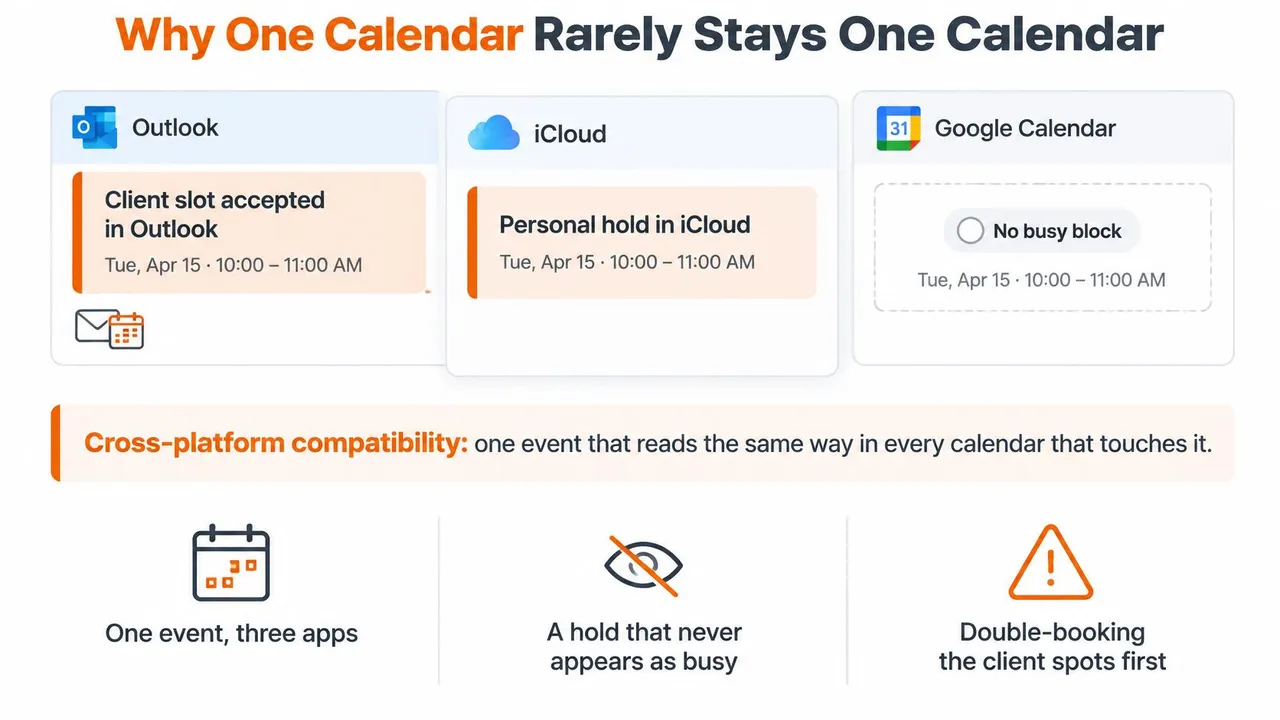
It’s Tuesday, and you’ve accepted a client meeting in Outlook. Then your iPhone reminds you about a personal appointment at the same time. You checked Google Calendar before accepting, but the iCloud hold never appeared there as busy. The missing piece wasn’t the appointment’s title or notes. It was the busy status attached to its time interval.
That’s the practical problem behind cross platform compatibility for calendar sync. You don’t need every calendar to look identical. You need each calendar people use to book you to reflect the commitments you’ve already made, without spreading private details farther than necessary.
Why One Calendar Rarely Stays One Calendar
Cross-platform compatibility means keeping a commitment accurate across Google Calendar, Microsoft Outlook or Office 365, and Apple Calendar without moving every account to the same vendor. For the consultant with conflicting appointments, success means the personal hold blocks client booking even though the client never sees the personal calendar.
Mixed environments aren’t unusual. In Stack Overflow’s 2022 Developer Survey, which received 71,503 responses, professional operating-system use included Windows at 48.82%, Linux-based systems at 39.89%, and macOS at 32.97%, with respondents allowed to select multiple systems, according to FOSS Post’s survey breakdown. Those figures describe developers, not calendar customers, but they illustrate why a single-platform assumption leaves people out.
Different accounts, one available person
A client chooses your work account. A university supplies an institutional calendar. Your family uses the calendar already on their phones. None of those choices changes the fact that you can only attend one conflicting commitment.
For example, an English-language teacher checking ELTica for when the next DELTA courses begin may need study commitments to block teaching availability. The school doesn’t need course notes, but its booking calendar does need the unavailable time.
- Account access: Can the synchronizer reach the calendar where the commitment lives?
- Event meaning: Does the destination recognize the copied interval as busy rather than merely displaying an event?
- Change handling: When the commitment moves or disappears, does availability change too?
Practical test: After a change on one side, the other side should show the right busy block at the right local time.
That test is more useful than counting connected apps. It asks whether the connection protects the person’s schedule.
How Google Microsoft and Apple Store the Same Meeting
How the three calendars model one event
| What must match | Google Calendar | Microsoft Outlook | Apple Calendar |
|---|---|---|---|
| API and format | Structured Calendar API objects | Microsoft Graph event objects | CalDAV with iCalendar VEVENT |
| Recurrence | Parent event plus recurrence rules | Separate pattern and range objects | RRULE, RDATE, and EXDATE on the VEVENT |
| Time zone | Dedicated time-zone fields | Properties such as originalStartTimeZone | VTIMEZONE inside the iCalendar payload |
| Change detection | Push notifications from the calendar | Push subscriptions with a limited lifetime | Often CalDAV polling for changes |
| All-day versus timed | Date values without a clock time | All-day flag with start/end date-time and zone handling | DATE versus DATE-TIME |
| Privacy split | Access can be wider than free/busy | App consent can expose full event text | Check the destination account’s calendar-sharing defaults |
Calendar compatibility is translation, not a shared file. Google Calendar and Microsoft Graph give applications structured event objects. Apple-compatible CalDAV exchanges iCalendar content, where a VEVENT represents an event. A synchronizer needs to translate the meaning of each field, not copy whatever text occupies a similar-looking box.
Consider a weekly standup. Its start and end describe an occurrence, but they don’t describe how the meeting repeats, when repetition ends, or which occurrence someone moved. A plain start-and-end copy can display a convincing appointment while leaving the rest of the series unprotected.
A field needs a destination, not just a name
An API is the interface software uses to read and change calendar information. Different interfaces can express the same intention through different structures. Microsoft’s separation of a recurrence pattern from its range, for example, requires the translator to preserve both how the meeting repeats and where that repetition begins and ends.
The same care applies to all-day handling. An all-day event means a calendar date or span of dates, not an appointment that happens to start at midnight. Converting it into a timed event changes its meaning before anyone even opens the destination calendar.
Use a real meeting to inspect the translation:
- Find the schedule: Identify its start, end, event type, and time-zone reference.
- Find the exceptions: Check where a changed or cancelled occurrence is represented.
- Find the permissions: Separate what the connector can read from what it should reproduce.
- Find the update path: Establish how the connector learns that the source changed.
A notification isn’t the event itself
A push notification tells a connector that something needs attention. Polling means the connector checks for changes. Neither mechanism, by itself, proves that the connector translated the changed record correctly.
Treat unsupported fields explicitly. A connector might preserve a field internally, transform it into a supported representation, or omit it with a clear explanation. Silent loss is the problem, especially when a field affects attendance or availability rather than appearance.
Recurrence Rules That Break on the Way Across
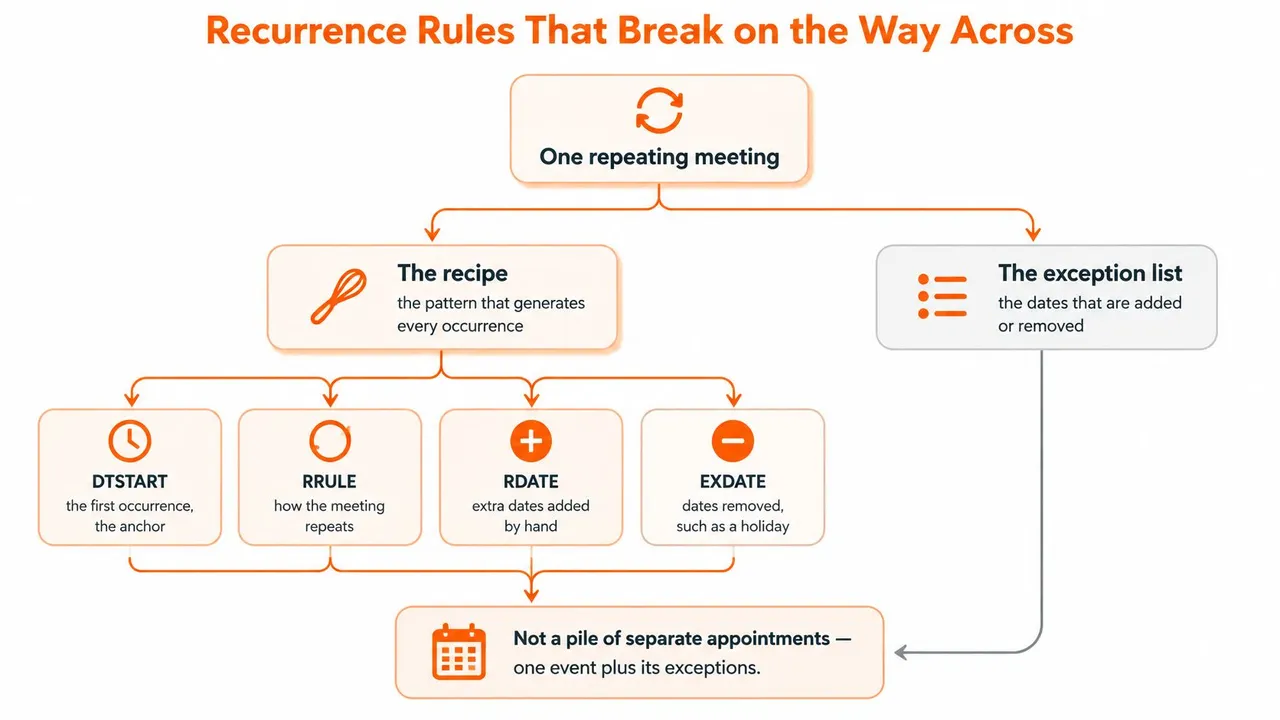
A repeating meeting is a recipe plus exceptions, not a pile of unrelated appointments. The recipe generates the expected schedule. The exceptions record the occasions when someone adds a date, cancels a meeting, or changes an individual occurrence.
The RFC 5545 recurrence-rule specification defines the recurrence set through DTSTART, RRULE, and RDATE, with EXDATE excluding dates. In plain language, the synchronizer needs the anchor, the repeating pattern, the added dates, and the removed dates.
Keep identity alongside the recipe
A useful internal representation retains the original provider identifier, recurrence rule, exception dates, recurrence-instance identifiers, attendee state, and source revision. The identifier tells the connector which event it already knows. The revision helps it distinguish a new change from an older copy coming back.
Without those details, familiar failures follow:
- A moved occurrence loses its identity: Say you move this week’s meeting to the afternoon. The destination treats the move as a separate event and leaves the original morning block behind.
- A cancellation loses its exclusion: You cancel a holiday occurrence, but the destination rebuilds the series from the repeating pattern and restores that date.
- An edit loses its revision: Each calendar treats the other calendar’s transformed copy as a fresh change, so the copies repeatedly overwrite each other.
For a readable way to inspect a pattern, use the RRULE generator. It helps separate the repeating instruction from the individual appointments you see on screen, though a correct rule still needs its exceptions and time-zone context.
Test changes, not just creation
Generating every future occurrence isn’t a substitute for preserving the underlying series. It also makes the connector retrieve and compare many individual records. Prefer incremental change handling within a defined date window rather than repeatedly rebuilding the entire calendar.
Create a test series, move an individual occurrence, cancel another, and change the series itself. Include a meeting whose schedule crosses a daylight-saving transition. Check the destination after each operation, then make a permitted change in the destination and inspect what returns.
Round-trip fidelity means the event retains its intended meaning after travelling across providers and back. Matching appointment cards on a phone prove only visual similarity, not that the next edit will survive.
Time Zones That Move a Meeting by an Hour
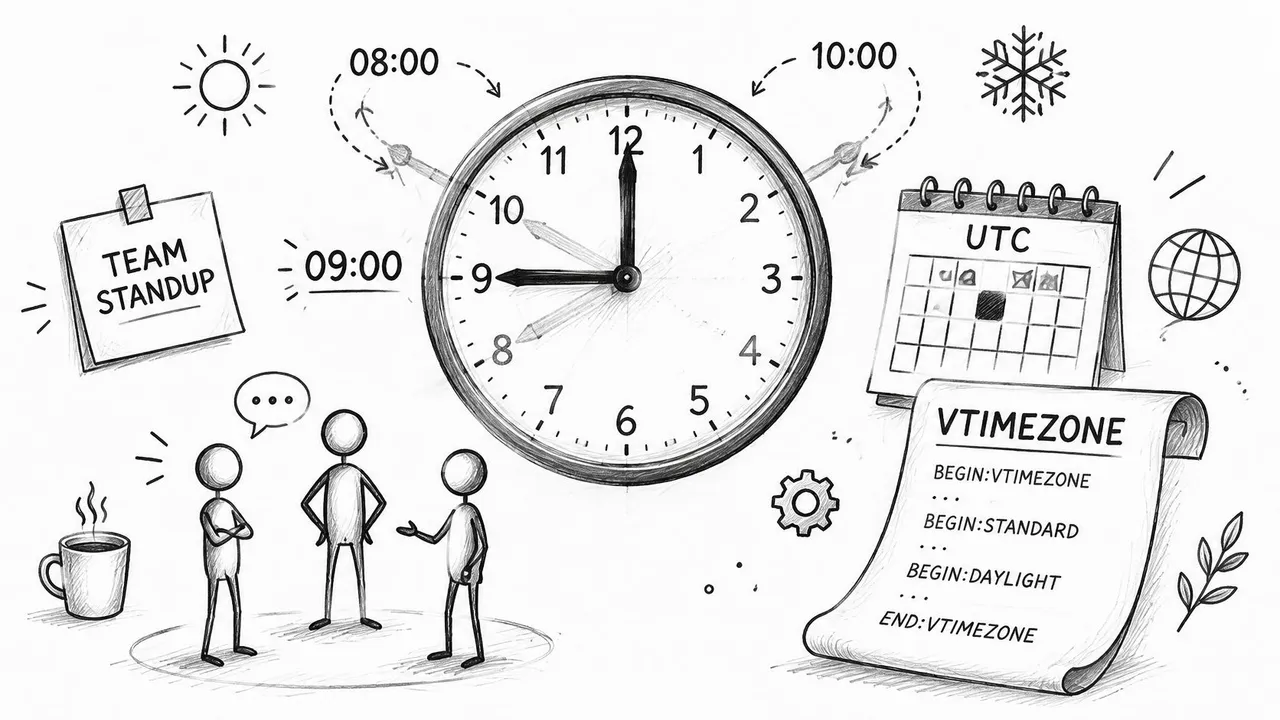
A standup intended for 09:00 local time can appear at 08:00 or 10:00 after a daylight-saving change if a connector preserves only a fixed UTC schedule rather than the recurring local-time intention. The RFC 5545 time-zone component specification requires referenced time-zone information to remain valid for all recurrence instances and recommends local time with a time-zone reference for recurring start times.
UTC is useful for identifying an instant. It doesn’t, on its own, express the instruction to keep meeting at the same local hour when the relationship between local time and UTC changes.
Preserve the kind of time you mean
For a timed recurring meeting, map the provider’s zone representation to a canonical IANA time-zone identifier, such as America/New_York. Keep the local schedule and the zone together rather than flattening the whole series into UTC-only values.
For an all-day trip, preserve a DATE value rather than manufacturing a midnight DATE-TIME. A civil date identifies the day on the calendar. Midnight identifies an instant in a particular zone, which can fall on another date when displayed elsewhere.
These mistakes affect more than reminders. A shifted block can tell a colleague you’re free during a real commitment. It can also mark an available hour as unavailable, making scheduling harder without anyone noticing an obvious error.
Compare displays in matching zones
Use this validation routine before trusting a cross-border schedule:
- Choose representative zones: Include a North American zone, a European zone, and a region without daylight saving.
- Inspect both sides of a transition: Compare occurrences before and after the clock change.
- Match display settings: View source and destination in the same zone before deciding that their displayed hours disagree.
- Check date boundaries: Confirm that all-day events still cover the intended civil dates.
- Isolate privacy changes: Rename or mask text separately from start, end, zone, and busy-status fields.
For the practical planning side, the guide to scheduling across time zones can help distinguish a participant’s viewing zone from the zone that anchors a meeting.
The same meeting needn’t display the same clock hour in different cities. It must display the correct equivalent time, and source and destination must agree when viewed in the same zone.
That distinction prevents a common false alarm. Different local hours can be correct; different instants for the same commitment aren’t.
What Should Cross the Boundary and What Should Not
A successful sync doesn’t need to copy every title, guest, location, and note. For a consultant, clinician, executive, or academic, availability may be the only information another account needs. More complete replication can create more exposure without improving scheduling.
A proposed IETF OAuth groupware-scopes framework distinguishes free/busy permission from full calendar read access, allowing availability to be exposed while withholding titles, descriptions, locations, and attendees. It’s a proposal, not a guarantee that every provider offers identical permissions, but the design principle is useful: request the narrowest access that accomplishes the job.
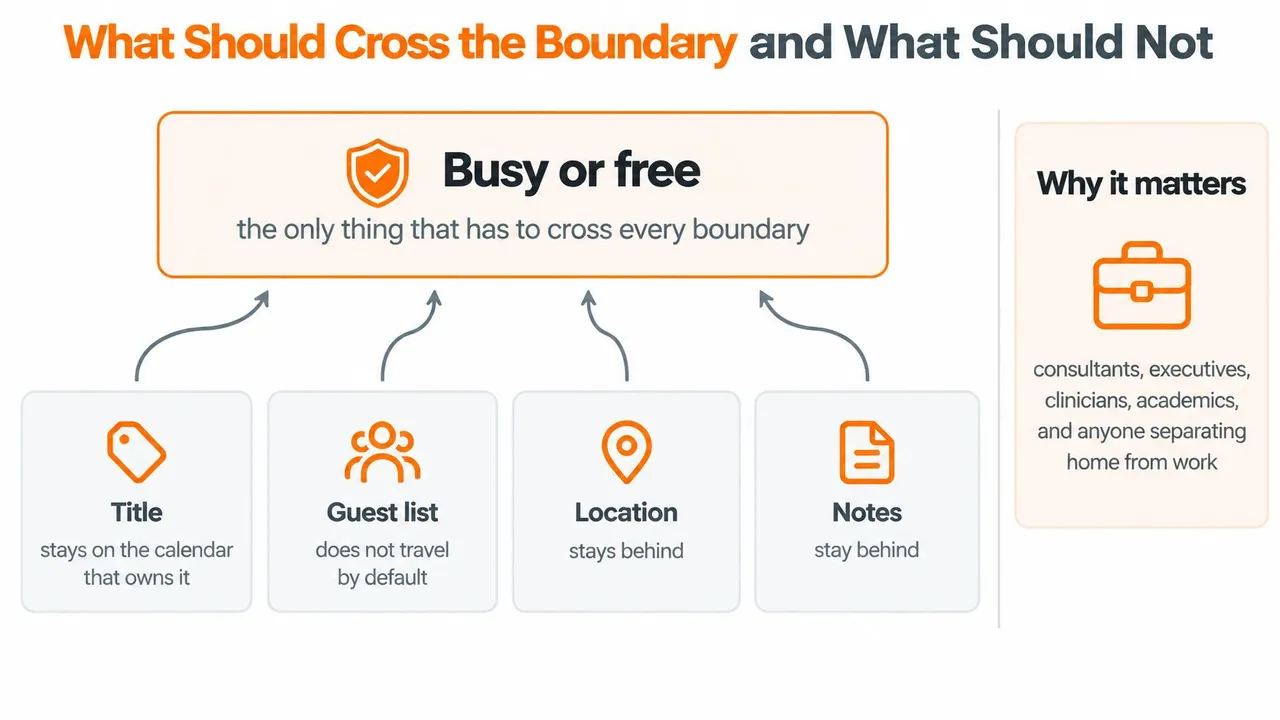
Permission and copying policy are separate
A connector’s permission determines what it can access. Its copying policy determines what it sends onward. A broad permission shouldn’t automatically become a broad replication policy.
Apply controls at the account, calendar, event, and field levels. Connect only the accounts required, select the relevant calendars, decide which events qualify, and specify the fields that may leave. Those choices answer different questions and shouldn’t be compressed into a single privacy switch.
Free/busy-only mirroring suits a work calendar that needs to block personal commitments. Title redaction can replace a sensitive label with a neutral description. Location removal prevents an address or clinic name from accompanying the block.
Keyword masking can provide an additional filter, but don’t make it the sole safeguard. A private appointment might use an unexpected title. Different internal and external viewing rules can also help, provided the destination enforces those distinctions.
The destination creates another exposure
Say a medical appointment on a personal iPhone needs to block a work afternoon in Google Calendar. Colleagues need the occupied interval, not the clinic name, treatment notes, or guest list.
Even if the source is tightly protected, the destination can have different administrators, retention practices, sharing defaults, or security controls. Once copied, event text exists under those destination conditions. Protecting the original doesn’t automatically protect its duplicate.
Which fields must cross this boundary to prevent double-booking?
Write that minimum list before connecting accounts. It should include enough scheduling information to represent availability correctly, plus whatever internal identifiers the connector needs to maintain the relationship. Personal context should remain at the source unless someone has a specific reason to receive it.
Scheduling Cases That Expose a Weak Sync
A freelancer’s school run should block client booking without naming the school. A salesperson receiving Outlook invitations in a Google-centered workflow needs a rescheduled occurrence to remain an exception. A student needs an all-day exam block to stay on the intended date, while someone with multiple jobs needs conflicting offline edits handled visibly.
Each situation tests a different part of compatibility. A calendar that looks complete can still make the wrong scheduling promise.
Compatibility tests a calendar sync should pass
| Case | Weak copy | Faithful behavior |
|---|---|---|
| Weekly series | Duplicates next week’s occurrences | Keeps the rule and the series identity |
| One edited occurrence | Resets that day to the series time | Preserves the exception only |
| Cancelled instance | Brings the cancelled day back | Keeps the exclusion |
| Daylight-saving cross | Shifts the intended local meeting hour | Holds the intended local hour with an IANA zone |
| All-day event | Covers the wrong civil day | Stays a date, not a midnight timestamp |
| Edits on two devices | Last write erases the other with no trace | Applies a stated conflict rule |
| Invitee response | Drops accepted or declined state | Keeps attendee state with the event |
| Attachment or reminder | Disappears with no warning | Drops or transforms the field explicitly |
Speed doesn’t settle conflicts
According to Truto’s calendar-integration architecture guide, Google push channels require renewal after a maximum of seven days, Microsoft subscriptions have their own lifetime constraints, and Apple change detection commonly uses CalDAV polling. Those mechanisms affect how connectors discover changes, but fast discovery doesn’t resolve what a change means.
Ask what happens when both copies change before either device reconnects. Does a designated source win? Does the connector apply a documented latest-change policy? Can the user see that a conflict occurred?
Deletion deserves the same scrutiny. Removing a mirrored block, cancelling an invitation, and deleting an organizer’s meeting aren’t interchangeable actions. Test the operation you expect the connector to perform.
Test the booking workflow too
People coordinating meetings need an authoritative availability calendar. If you’re considering LatHire’s appointment setters, define which calendar they should use and what details they may see before delegating booking.
Also distinguish busy-time mirroring from invitation management. A destination block shouldn’t imply that its owner has become the meeting organizer or that invitees received an update.
Mark the matrix rows your working week is most likely to fail. Reproduce those cases with harmless test events before relying on the connection for client appointments.
Mirror Busy Time Before You Copy Details
If double-booking is the problem, start with free/busy mirroring. Add titles or other context only when a destination viewer needs them to make a decision. This keeps the initial setup easier to inspect and limits unnecessary disclosure.
At SyncThemCalendars, we support Google Calendar, Microsoft Outlook or Office 365, and Apple Calendar through iCloud, in any combination. You connect accounts by signing in with Google, Microsoft, or Apple in your browser, with no installation needed. We copy free/busy times across your calendars in real time, so a personal iPhone commitment can block work availability, or a Google commitment can appear as busy to Microsoft colleagues.
Choose direction before adding detail
Each sync has its own settings and can run one-way or two-way. Use the guide to one-way calendar sync to decide whether the destination should only reflect the source or whether changes need to travel back.
- Name the booking destination: Identify the calendar other people consult when choosing time with you.
- Choose the source commitments: Include the personal, work, or institutional events that should affect that availability.
- Set the privacy boundary: Use field controls to rename or hide titles, descriptions, and locations.
- Validate before expanding: Make a harmless test event, edit it, and remove it. Inspect the results from the destination account rather than relying on your combined phone view.
Keep the acceptance check small
The destination should show the intended occupied interval. A changed occurrence should retain its individual schedule, and a cancellation shouldn’t return. Private words should remain outside the destination unless you deliberately chose to copy them.
Keep event details at the source while you observe normal booking activity. If someone needs more context, add the specific field they need rather than enabling full-detail copying by default.
This is the useful standard for cross platform compatibility: the smallest reliable transfer that prevents conflicting commitments. Connected accounts are only the starting point. Accurate availability, understandable change behavior, and deliberate privacy choices are what make the connection worth keeping.
SyncThemCalendars offers browser-based calendar synchronization across Google, Microsoft, and Apple accounts, with control over sync direction and copied details. Visit SyncThemCalendars to connect the calendars behind your last scheduling conflict, mirror busy time first, and expand the shared fields only after checking that availability stays accurate.
Ready to sync your calendars?
Keep your Google, Outlook and Apple iCloud calendars in sync automatically. 2-minute setup, no credit card required.
Get started freeKeep reading
More in Guides
Why Is My Calendar Not Syncing? Causes and Fixes
Why is my calendar not syncing? Diagnose Google, Outlook and Apple Calendar sync problems by symptom, then apply the fix that matches your cause.
Synchronize Apple Calendar with Outlook: A 2026 Guide
Step-by-step guide: Synchronize Apple Calendar with Outlook on Windows, iPhone and Mac, with two-way options, privacy trade-offs and fixes.
SyncThemCalendars Quick Setup Walkthrough
Master the SyncThemCalendars quick setup in minutes. Connect Google, Outlook, or iCloud, configure privacy masking, and verify your first sync effortlessly.