







5 Best Microsoft Bookings Alternatives (2026 Comparison Guide)
Looking for a better alternative to Microsoft Bookings? Discover the top tools for 2026, compare features, pricing, and find the perfect fit.
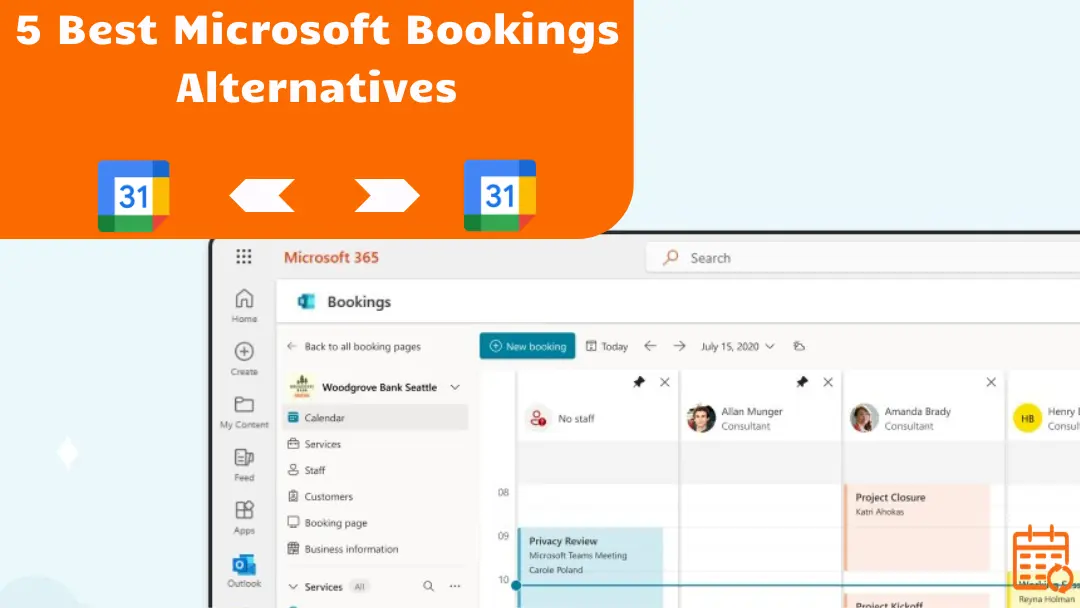
Microsoft Bookings may seem sufficient at first, but its limitations quickly become apparent:
- limited customization,
- basic automation,
- strong dependence on the Microsoft ecosystem.
As your scheduling needs grow more complex, looking for a more flexible and scalable alternative becomes a natural next step.
In this comparison guide, we review the 5 best Microsoft Bookings alternatives, including :
- a quick comparison table,
- head-to-head comparisons,
- recommendations based on your specific use case.
So you can choose the solution that truly fits your needs.
💡 If you’re managing several professional accounts, learning how to sync multiple calendars efficiently can help you avoid conflicts and keep full visibility across platforms.
Quick Comparison Table
| Tool | Best For | Free Plan | Starting Price | Key Strength | Main Limitation |
|---|---|---|---|---|---|
| Calendly | Large teams & automation | 🟢 | From $10/user/month | Advanced workflows & integrations | Advanced features require paid plan |
| Google Calendar + Appointment Schedules | Google ecosystem users | 🟠 | Included in Google Workspace | Native Google integration | Fewer automation options |
| Acuity Scheduling (Squarespace) | Service businesses & payments | 🔴 | From $16/month | Built-in payments & customization | Can be overkill for simple scheduling |
| SyncThemCalendars | Budget-conscious teams | 🟢 | From $3.99/month ⭐ Best value | Affordable & simple setup | Fewer advanced features |
| Doodle | Group scheduling & polls | 🟢 | From $6.95/user/month | Easy coordination for multiple participants | Less suited for client-facing booking pages |
💡For teams working across ecosystems, understanding how to sync Google Calendar with Outlook is often the first step toward eliminating double bookings.
5 Best Microsoft Bookings Alternatives in 2026
Doodle : Best for Group Scheduling Expert
Doodle is a well-known scheduling tool designed to simplify meeting coordination among multiple participants. Doodle excels at group scheduling through its availability polling system. It helps teams quickly identify a common time slot without endless back-and-forth emails.
🗝️Key Features
- Create availability polls in seconds.
- Invite participants via link or email.
- Consolidated response view to find the best time slot.
- Integration with Google Calendar, Outlook, and iCloud.
- Automatic reminders and time zone management.
- Individual booking pages (on paid plans).
➕Pros
- Very easy to use.
- Ideal for coordinating multiple participants.
- Free version available.
- Quick setup with minimal configuration.
- Works well for internal meetings and collaborative projects.
➖Cons
- Less suited for client-facing commercial appointments.
- Fewer advanced automation features than tools like Calendly.
- Limited customization on free plans.
💲Pricing
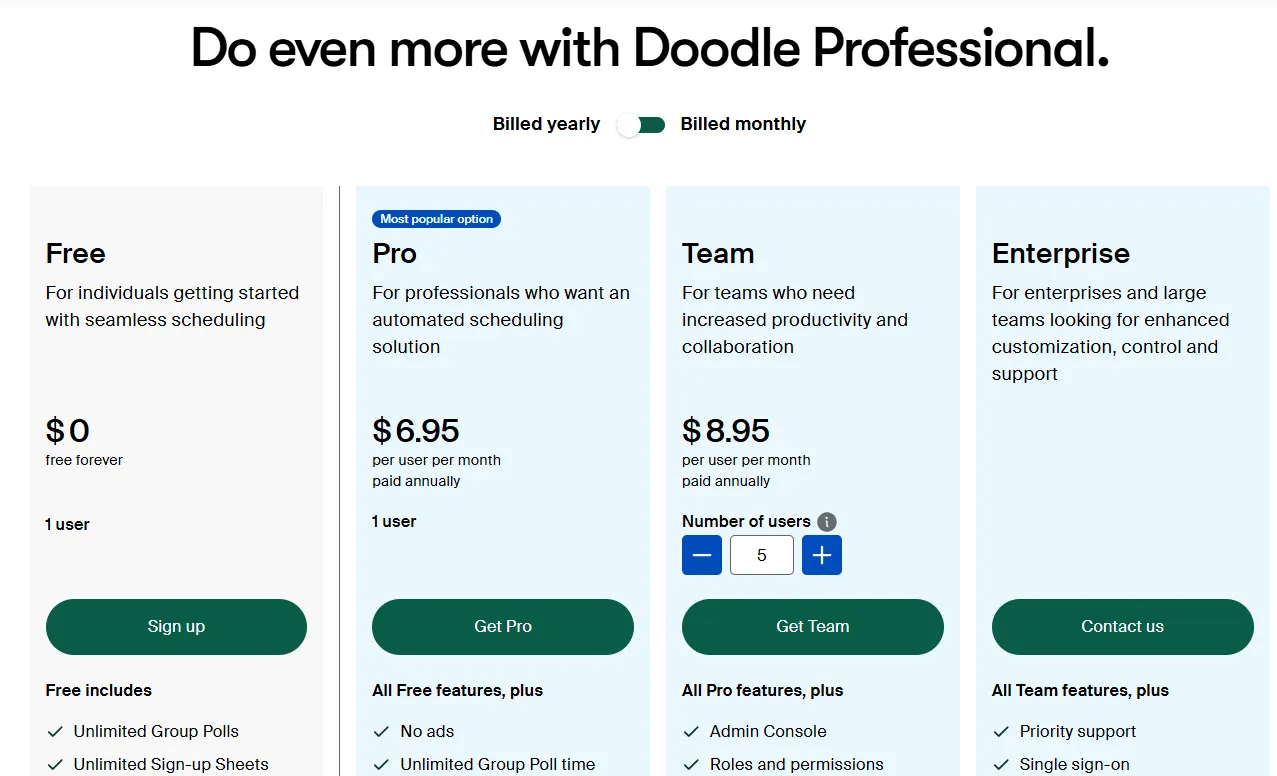
Doodle offers a free plan with basic functionality. Paid plans typically start at around $6 per user per month, unlocking advanced features such as ad-free scheduling and additional booking capabilities.
Ideal User Profile
Doodle is particularly well-suited for teams, committees, associations, and project groups that regularly need to coordinate meetings involving multiple participants and quickly identify a shared time slot.
SyncThemCalendars: Best Budget Option
SyncThemCalendars is a calendar synchronization tool that now supports all major calendar providers, including Google Calendar, Microsoft Outlook/Office 365, and Apple Calendar (iCloud). It focuses on one core mission: keeping multiple calendars perfectly aligned in real time to prevent double bookings and scheduling conflicts.
🗝️Key Features
- Sync between Google, Outlook/Office 365, and Apple (iCloud).
- Quick setup in just a few clicks, no technical skills required.
- Custom synchronization rules (titles, descriptions, locations, etc.).
- Fully automated sync once configured.
- Real-time updates across all connected calendars.
➕Pros
- Extremely fast and easy setup.
- Clean, intuitive interface.
- Affordable and transparent pricing.
- Responsive customer support.
- Reliable cross-platform synchronization.
➖Cons
- Fewer advanced features than dedicated scheduling tools.
- Less suitable for large teams with complex workflow needs.
💲Pricing
SyncThemCalendars offers a simple pricing model:
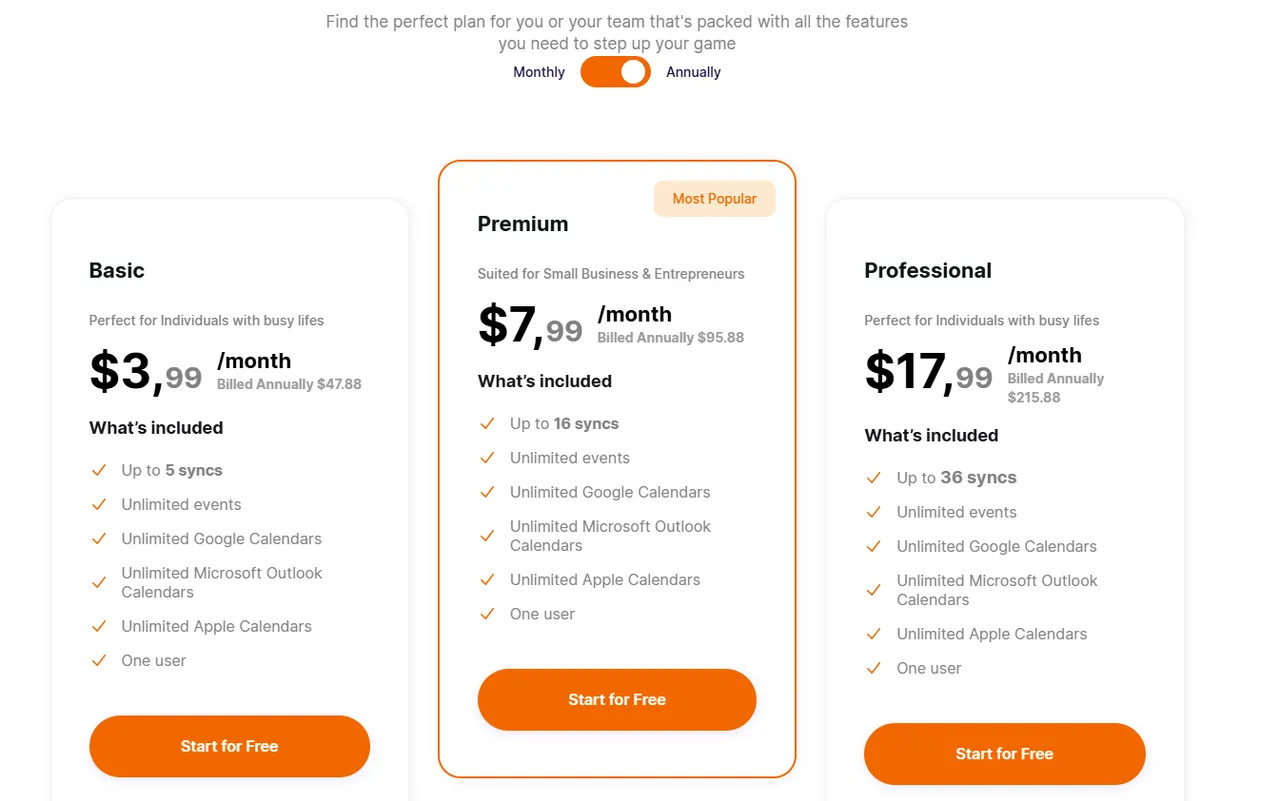
- $3.99 per month.
- 14-day free trial available.
Ideal User Profile
SyncThemCalendars is ideal for freelancers, small businesses, and multi-platform users who need a reliable, no-frills solution to sync multiple calendars, avoid scheduling conflicts, and maintain a unified view of their availability.
💡 If you’re unsure which platform fits your workflow best, this breakdown of Google Calendar vs Outlook Calendar highlights the key differences in flexibility and integration. Businesses dealing with overlapping schedules may benefit from exploring the best calendar synchronization apps available today.
Acuity Scheduling: Best for Service Businesses
Acuity Scheduling, owned by Squarespace, is a powerful scheduling platform designed primarily for service-based businesses. Acuity focuses on customization, client intake forms, and payment processing.
🗝️Key Features
- Fully customizable booking pages.
- Client intake forms and questionnaires.
- Built-in payment processing (Stripe, PayPal, Square).
- Automated confirmations, reminders, and follow-ups.
- Packages, memberships, and subscriptions.
- Multiple staff and location management.
- Calendar sync with Google, Outlook, and iCloud.
➕Pros
- Strong customization capabilities.
- Integrated payments and invoicing.
- Excellent for service-based workflows.
- Supports complex scheduling rules.
- Professional client-facing experience.
➖Cons
- No true free plan.
- Can feel complex for simple scheduling needs.
- Less focused on sales-team routing automation.
💲Pricing
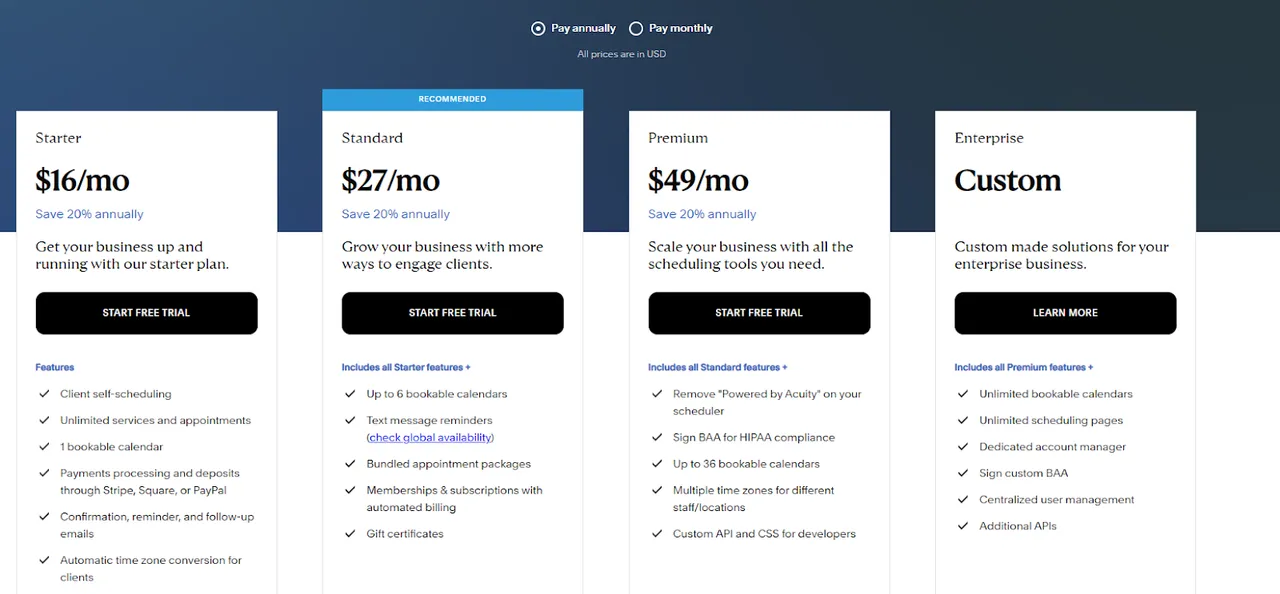
Acuity does not offer a permanent free plan. Paid plans typically start around $16 per month, with higher tiers unlocking advanced automation, team features, and subscription management tools.
Ideal User Profile
Acuity Scheduling is ideal for consultants, therapists, coaches, salons, and small businesses that require appointment payments, intake forms, and structured service workflows rather than simple meeting scheduling.
Calendly: Best for Large Teams
Calendly is one of the most established scheduling platforms on the market. Designed to simplify meeting booking at scale, it goes beyond basic appointment scheduling by offering advanced automation, routing, and team coordination features.
🗝️Key Features
- Automated meeting scheduling with customizable event types.
- Round-robin and collective team scheduling.
- Advanced workflows (reminders, follow-ups, routing rules).
- CRM integrations (e.g., Salesforce, HubSpot).
- Custom availability rules and buffer times.
- Payment collection via Stripe and PayPal.
- Analytics and reporting (on higher-tier plans).
➕Pros
- Very intuitive user experience.
- Powerful automation capabilities.
- Strong integration ecosystem.
- Scales well for growing teams.
- Professional, customizable booking pages.
➖Cons
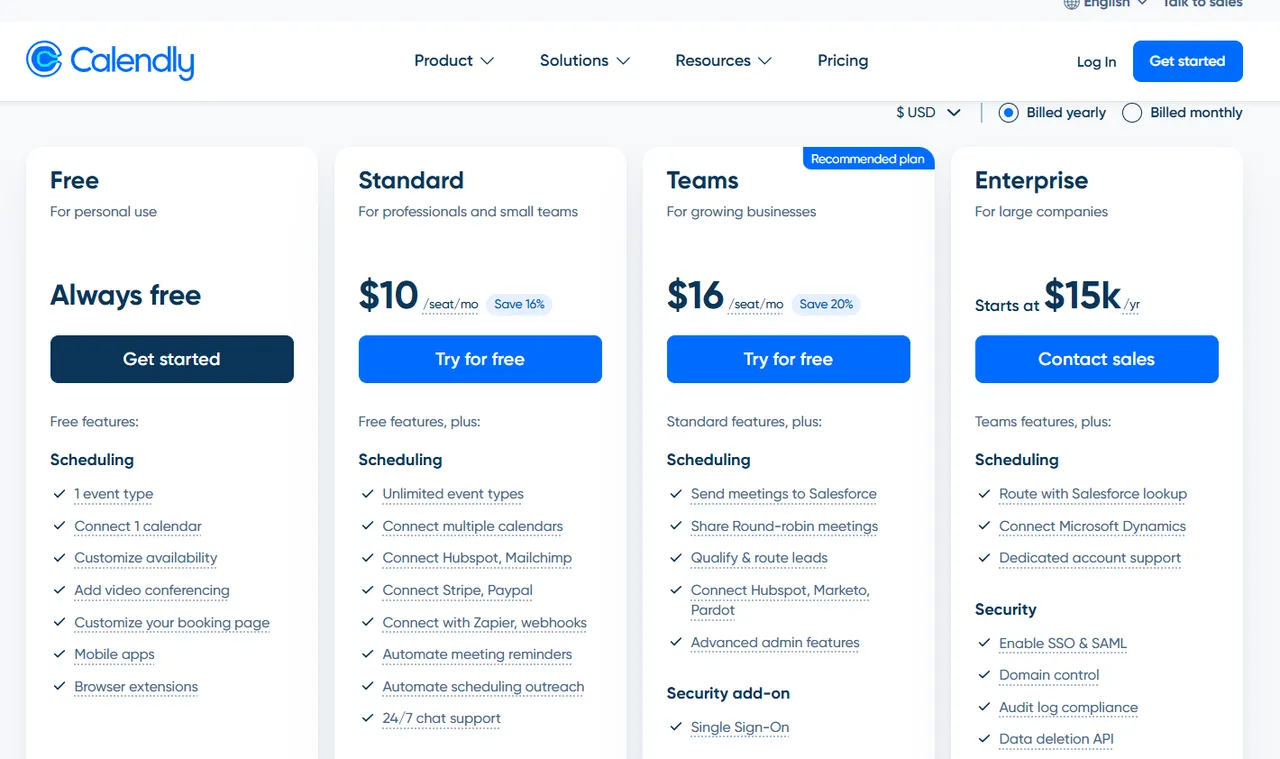
- Advanced features require paid plans.
- Pricing increases quickly for large teams.
- Some customization limits on lower tiers.
💲Pricing
Calendly offers a limited free plan suitable for individuals. Paid plans typically start around $10 per user per month, with more advanced automation, integrations, and team features available in higher-tier plans.
Ideal User Profile
Calendly is best suited for growing teams, sales organizations, agencies, and service-based businesses that require automation, CRM integration, and structured scheduling workflows across multiple team members.
Google Calendar + Google Appointment Schedules: Best for Google Ecosystem
Google Calendar with Google Appointment Schedules is Google’s native solution for letting others book time directly on your calendar.
🗝️Key Features
- Create booking pages directly from Google Calendar.
- Clean and intuitive interface.
- Automatic availability detection.
- Real-time sync across all Google calendars.
- Built-in time zone handling.
- Email notifications and calendar reminders.
- Native integration with Gmail and Google Meet.
➕Pros
- No third-party tool required.
- Seamless integration with Gmail, Meet, and Drive.
- Very easy to set up and manage.
➖Cons
Limited automation capabilities.
No advanced workflows or routing logic.
Limited customization options.
Less suited for complex team scheduling scenarios.
💲Pricing
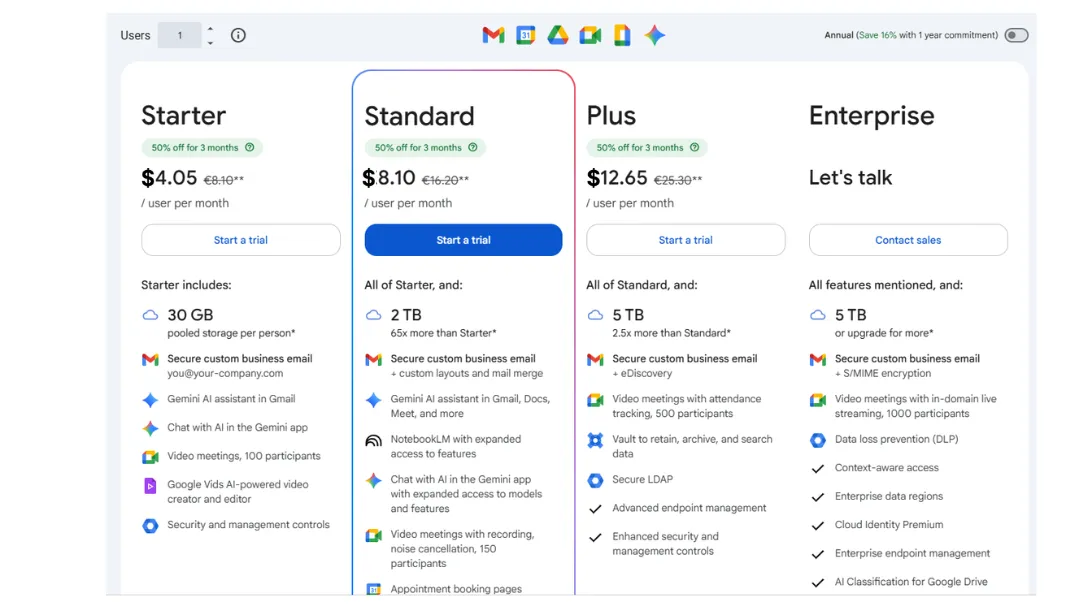
Google Appointment Schedules is included at no additional cost with eligible Google Workspace plans. There is no standalone version available outside of Google Workspace.
Ideal User Profile
This solution is ideal for freelancers, small teams, and businesses already using Google Workspace who need a simple, native scheduling option without investing in a dedicated third-party platform.
Microsoft Bookings vs Top Alternatives (Head-to-Head)
Microsoft Bookings vs Doodle
If you mainly schedule one-on-one appointments, Bookings is the better fit.
If your priority is finding a common time slot for a group, Doodle is more efficient.
Comparison Table
| Feature | Microsoft Bookings | Doodle |
|---|---|---|
| Primary use | 1-to-1 appointments | Group polls |
| Integration | Outlook & Teams | Google, Outlook, iCloud |
| Automation | Basic | Limited |
| Booking page | 🟢 | 🟢 |
| Best for | Services & SMEs | Multi-participant meetings |
Key Differences
- Approach: Bookings works as a traditional booking page, while Doodle relies on availability voting to identify the best time slot.
- Use case: Bookings is client-facing; Doodle is built for coordinating multiple participants.
- Complexity: Doodle is simpler to set up but less structured for advanced professional workflows.
Decision Guidance
Choose Microsoft Bookings if you manage one-on-one client appointments within the Microsoft ecosystem.Choose Doodle if you regularly need to coordinate meetings involving multiple participants.
Microsoft Bookings vs SyncThemCalendars
If you need a public booking page for clients, Microsoft Bookings is the right choice.
If your priority is keeping multiple calendars (Google, Outlook, iCloud) aligned without double bookings, SyncThemCalendars is simpler and more cost-effective.
Comparison Table
| Feature | Microsoft Bookings | SyncThemCalendars |
|---|---|---|
| Primary function | Appointment scheduling | Calendar synchronization |
| Public booking page | 🟢 | 🔴 |
| Multi-platform sync | Microsoft ecosystem only | Google, Outlook, iCloud |
| Two-way sync | 🔴 | 🟢 |
| Conditional sync (busy only) | 🔴 | 🟢 |
| Best for | Managing client bookings | Preventing multi-calendar conflicts |
Key Differences
- Core purpose: Microsoft Bookings allows clients to book time with you. SyncThemCalendars keeps your calendars aligned across platforms.
- Ecosystem scope: Bookings is centered around Microsoft 365. SyncThemCalendars connects multiple calendar providers.
- Sync flexibility: SyncThemCalendars supports both bi-directional and one-way synchronization, with customizable rules (e.g., syncing only “busy” status), which Microsoft Bookings does not offer. Complexity & cost: SyncThemCalendars is lighter and more affordable but does not replace a full booking platform.
Decision Guidance
Choose Microsoft Bookings if you need a client-facing tool to manage appointments. Choose SyncThemCalendars if you manage multiple calendars across different platforms and want to eliminate scheduling conflicts with a simple, automated solution.
💡 Professionals juggling multiple projects can discover practical strategies on how to manage multiple calendars effectively without losing track of availability. If you collaborate with different companies, here’s how to keep your calendar in sync across multiple organizations without constant manual updates.
Microsoft Bookings vs Acuity Scheduling
If you want a native solution without adding an external tool, Bookings may be enough. If you need online payments, detailed client intake forms, and advanced customization, Acuity is the better fit.
Comparison Table
| Feature | Microsoft Bookings | Acuity Scheduling |
|---|---|---|
| Booking page | 🟢 | 🟢 |
| Built-in payments | 🔴 | 🟢 |
| Client intake forms | Basic | Advanced & customizable |
| Automation | Limited | More robust |
| Free plan | Included with Microsoft 365 | 🔴 |
| Best for | SMEs & internal teams | Paid services & solo businesses |
Key Differences
- Monetization: Acuity allows you to collect payments at the time of booking, unlike Microsoft Bookings.
- Customization: Acuity offers more flexibility to tailor the client experience (forms, packages, subscriptions).
- Positioning: Bookings is an extension of Microsoft 365, while Acuity is a dedicated scheduling platform for service businesses.
Decision Guidance
Choose Microsoft Bookings if you already use Microsoft 365 and manage simple appointments without payment processing. Choose Acuity Scheduling if your business depends on paid appointments, detailed intake forms, or a more customizable booking experience.
Microsoft Bookings vs Calendly
Microsoft Bookings is a simple solution tightly integrated with Microsoft 365. Calendly is more powerful, more flexible, and better suited for growing teams.
If you have basic scheduling needs within the Microsoft ecosystem, Bookings may be enough.
If you need advanced automation and team routing, Calendly clearly has the edge.
Comparison Table
| Feature | Microsoft Bookings | Calendly |
|---|---|---|
| Automation | Basic | Advanced |
| Team routing | Limited | Round-robin + rules |
| Integrations | Microsoft ecosystem | Broad ecosystem (CRM, Zoom, Slack…) |
| Payments | 🔴 | 🟢 |
Key Differences
- Integration: Bookings is built for Outlook and Teams. Calendly works across a much broader ecosystem.
- Automation: Calendly offers advanced workflows and routing; Bookings remains more basic.
- Scalability: Calendly is better suited for structured sales or marketing teams.
Decision Guidance
Choose Microsoft Bookings if you’re already using Microsoft 365 and have simple scheduling needs. Choose Calendly if you need stronger automation, integrations, and flexibility.
Microsoft Bookings vs Google Calendar + Appointment Schedules
If you’re already in the Microsoft ecosystem, Bookings integrates seamlessly. If you primarily use Google Workspace and have basic scheduling needs, Google’s solution may be sufficient.
Comparison Table
| Feature | Microsoft Bookings | Google Calendar + Appointment Schedules |
|---|---|---|
| Booking page | 🟢 | 🟢 |
| Native integration | Outlook & Teams | Gmail, Meet, Google Calendar |
| Automation | Limited | Very limited |
| Built-in payments | 🔴 | 🔴 |
| Customization | Basic | Limited |
| Best for | Microsoft 365 users | Google Workspace users |
Key Differences
- Ecosystem: Bookings is centered around Microsoft 365, while Google Appointment Schedules is fully integrated into Google Workspace.
- Features: Both tools are relatively simple, but Google’s solution is even more minimal in terms of automation.
- Flexibility: Bookings offers slightly more structure for teams, while Google prioritizes simplicity.
Decision Guidance
Choose Microsoft Bookings if you use Outlook and Teams and want a solution fully integrated into your Microsoft environment. Choose Google Calendar + Appointment Schedules if you’re already using Google Workspace and need a straightforward, native scheduling option.
Which Microsoft Bookings Alternative Is Right for You?
Choosing the right solution ultimately depends on your environment and specific needs. Here’s a clear summary to help you decide quickly.
For Sales and Marketing Teams → Calendly.
If you need advanced automation, intelligent lead routing, and CRM integrations, Calendly is the better fit. It’s particularly well-suited for growing teams.
For Google Workspace Users → Google Calendar + Appointment Schedules.
If you work exclusively within Gmail, Google Meet, and Google Calendar, Google’s native solution is sufficient for basic scheduling needs.
For Service Businesses That Charge for Appointments → Acuity Scheduling.
If your business relies on paid appointments, detailed client intake forms, or bundled service offerings, Acuity provides greater flexibility.
For Syncing Multiple Calendars (Google, Outlook, iCloud) → SyncThemCalendars.
If your priority is preventing conflicts across multiple calendars without needing a public booking page, this is the simplest and most cost-effective option.
For Coordinating Group Meetings → Doodle.
If you frequently need to align multiple participants and quickly find a common time slot, Doodle is especially effective.
Microsoft Bookings Pricing vs Competitor Costs
| Tool | Free plan | Free trial | Starting price | Most common plan |
|---|---|---|---|---|
| Microsoft Bookings | 🔴 | 🔴 | Included in subscription | Medium 365 plan |
| Calendly | 🟢 | 🟢 | $10/user/mo | $15–30 |
| Google Appointment | 🟢 | 🔴 | Included with Workspace | Workspace plan |
| Acuity | 🔴 | 🟢 | $16/mo | $25+ |
| SyncThemCalendars | 🟢 | 🟢 | $3.99/mo ⭐ Best value | $48/yr |
| Doodle | 🟢 | 🔴 | $6.95/user/mo | $12+ |
💡 Important notes:
- Microsoft Bookings does not have a separate price: it is included in Microsoft 365.
- Some alternatives offer free or very affordable plans.
- Some tools cost more but provide added value (payments, CRM, automation).
Why Businesses Move Away from Microsoft Bookings
While Microsoft Bookings works well for basic scheduling needs, many businesses eventually look for more flexibility, automation, or ecosystem independence. As teams grow and processes become more structured, limitations that were once acceptable can start to slow operations down.Here are the most common reasons companies explore alternatives.
- Limited Customization : Microsoft Bookings offers basic branding and booking page configuration, but customization options remain relatively restricted. Businesses that want a highly tailored client experience or more control over layout and messaging may find the tool limiting.
- Basic Automation Capabilities : While Bookings handles confirmations and reminders, it lacks advanced automation features such as multi-step workflows, intelligent lead routing, or conditional logic. Growing sales and marketing teams often require more sophisticated scheduling automation.
- Strong Dependence on the Microsoft Ecosystem : Microsoft Bookings integrates seamlessly with Outlook and Teams, but it is heavily centered around Microsoft 365. Companies using a mixed tech stack (Google Workspace, CRM platforms, third-party tools) may prefer a more ecosystem-agnostic solution.
- Limitations in Hybrid or On-Premise Environments: Microsoft Bookings works best when fully deployed within Exchange Online. Organizations running hybrid or on-premise Exchange environments may encounter compatibility limitations, deployment constraints, or restricted functionality. For IT teams managing transitional infrastructure, this can become a blocking factor.
Other Microsoft Bookings Alternatives Worth Considering
While the tools featured in our Top 5 cover most common needs, several other solutions deserve a mention. They were not included in the main selection due to a narrower focus or overlapping capabilities, but they may still be a good fit depending on your specific requirements.
- YouCanBookMe: A lightweight and flexible scheduling tool known for its strong customization options and reliable calendar syncing. It’s a close alternative to Microsoft Bookings but less differentiated compared to more advanced platforms.
- SimplyBook.me: Popular among salons, clinics, and service-based businesses, SimplyBook.me offers extensive customization options. It is particularly well-suited for businesses with industry-specific needs.
- Zoho Bookings: A logical choice for companies already using the Zoho ecosystem (CRM and business apps). It integrates naturally with Zoho CRM but is less compelling outside that environment.
- Cal.com: An open-source platform aimed at developers and startups, offering high levels of customization and technical control. Ideal for tech teams seeking a highly adaptable scheduling solution.
- Setmore: A budget-friendly alternative frequently mentioned in comparison guides. It offers an attractive free plan but remains simpler than some premium tools.
- HubSpot (Meetings Tool): Integrated into HubSpot’s CRM, this tool is especially suitable for sales and marketing teams looking for direct synchronization with their pipeline.
How We Tested These Microsoft Bookings Alternatives
To provide a fair and practical comparison, we evaluated each scheduling tool using the same criteria and real-world usage scenarios. Our analysis focused on the following factors:
1️⃣Ease of Setup: We assessed how quickly a new user can create an account, configure availability, and publish a booking link.
2️⃣ Core Scheduling Features: We reviewed booking page customization, calendar syncing, reminders, team scheduling, and automation capabilities.
3️⃣ Integrations & Ecosystem Compatibility: We tested compatibility with major calendar providers (Google, Outlook, iCloud), CRM platforms, and video conferencing tools.
4️⃣ Pricing Transparency & Value: We compared free plans, trial availability, entry-level pricing, and the overall value offered at each pricing tier.
5️⃣ Use-Case Suitability: Each tool was evaluated based on how well it serves specific needs, such as sales teams, service businesses, group scheduling, or multi-calendar synchronization.
This methodology ensures that our recommendations are based on functionality, usability, and practical business impact, not just feature lists.
FAQs About Microsoft Bookings Alternatives
Is there a Google equivalent to Microsoft Bookings?
Yes. Google offers an equivalent through Google Calendar + Appointment Schedules, integrated into Google Workspace. It allows users to create booking pages directly from Google Calendar. However, the features remain fairly basic. For advanced needs or multi-platform environments, a dedicated scheduling solution may be more suitable.
Which is better, Calendly or Microsoft Bookings?
It depends on your needs. Microsoft Bookings is ideal if you’re already using Microsoft 365 and need simple, native scheduling. Calendly is better for advanced automation, team routing, and CRM integrations. For growing sales or marketing teams, Calendly generally offers more flexibility and scalability.
What is the best appointment scheduling software?
The best appointment scheduling software depends on your specific needs:
- Calendly is strong for automation and team workflows,
- Acuity Scheduling works well for paid services,
- Google Appointment Schedules suits basic needs within Google Workspace,
- For multi-calendar synchronization without full booking features, tools like SyncThemCalendars can also be highly effective.
Does Office 365 include a scheduling tool?
Yes. Office 365 (now Microsoft 365) includes Microsoft Bookings in eligible business and enterprise plans. It allows organizations to create booking pages, manage staff availability, and sync appointments with Outlook and Teams. However, it is not available as a standalone product and requires a qualifying Microsoft 365 subscription.
Ready to Try SyncThemCalendars? Try SyncThemCalendars for free and keep all your calendars synchronized. Google, Apple, Microsoft, it supports them all!
Ready to sync your calendars?
Keep your Google, Outlook and Apple iCloud calendars in sync automatically. 2-minute setup, no credit card required.
Get started freeKeep reading
More in Comparisons
iCloud Calendar vs Google Calendar: Real-World Comparison
iCloud Calendar vs Google Calendar compared on features, sharing, privacy, sync speed, and ecosystem fit, with a clear guide to bridging the two.
Top 5 Calendar Synchronization Apps in 2026
Discover the 5 best calendar synchronization apps in 2026 to stay organized and avoid schedule conflicts.

Google Calendar VS Outlook Calendar: which one to choose in 2026?
Google or Outlook Calendar? Stop guessing. Compare strengths, limits, and sync issues—then fix them fast with SyncThemCalendars.